JSON 转 Dart Entity
概述
在 Flutter 开发中,处理 JSON 数据是日常开发的重要环节。手动编写 Dart 实体类不仅耗时,还容易出错。iFlutter 提供了强大的 JSON 转 Dart Entity 功能,能够快速、准确地将 JSON 数据转换为 Dart 实体类。
🚀 功能特性
智能转换
- 自动类型推导:根据 JSON 数据自动推导 Dart 数据类型
- 嵌套对象支持:支持复杂的嵌套 JSON 结构
- 数组处理:智能处理 JSON 数组,生成对应的 List 类型
- 空安全支持:生成符合 Dart 空安全规范的代码
使用限制
该功能仅在 Flutter 项目的 lib 目录及其子目录下可用,确保生成的文件位于正确的源码目录中。
🛠️ 使用方法
操作演示
使用步骤
- 选择位置:在
lib目录或其子目录中右键选择创建位置 - 输入 JSON:在弹出的对话框中粘贴 JSON 数据
- 设置类名:输入要生成的 Dart 类名(建议使用驼峰命名法)
- 生成代码:点击确认,自动生成 Dart 实体类文件
⚙️ 配置说明
空安全配置
默认情况下,生成的 Dart 实体类支持空安全特性。如果项目尚未迁移到 Flutter 2.x 版本,可以通过配置调整:
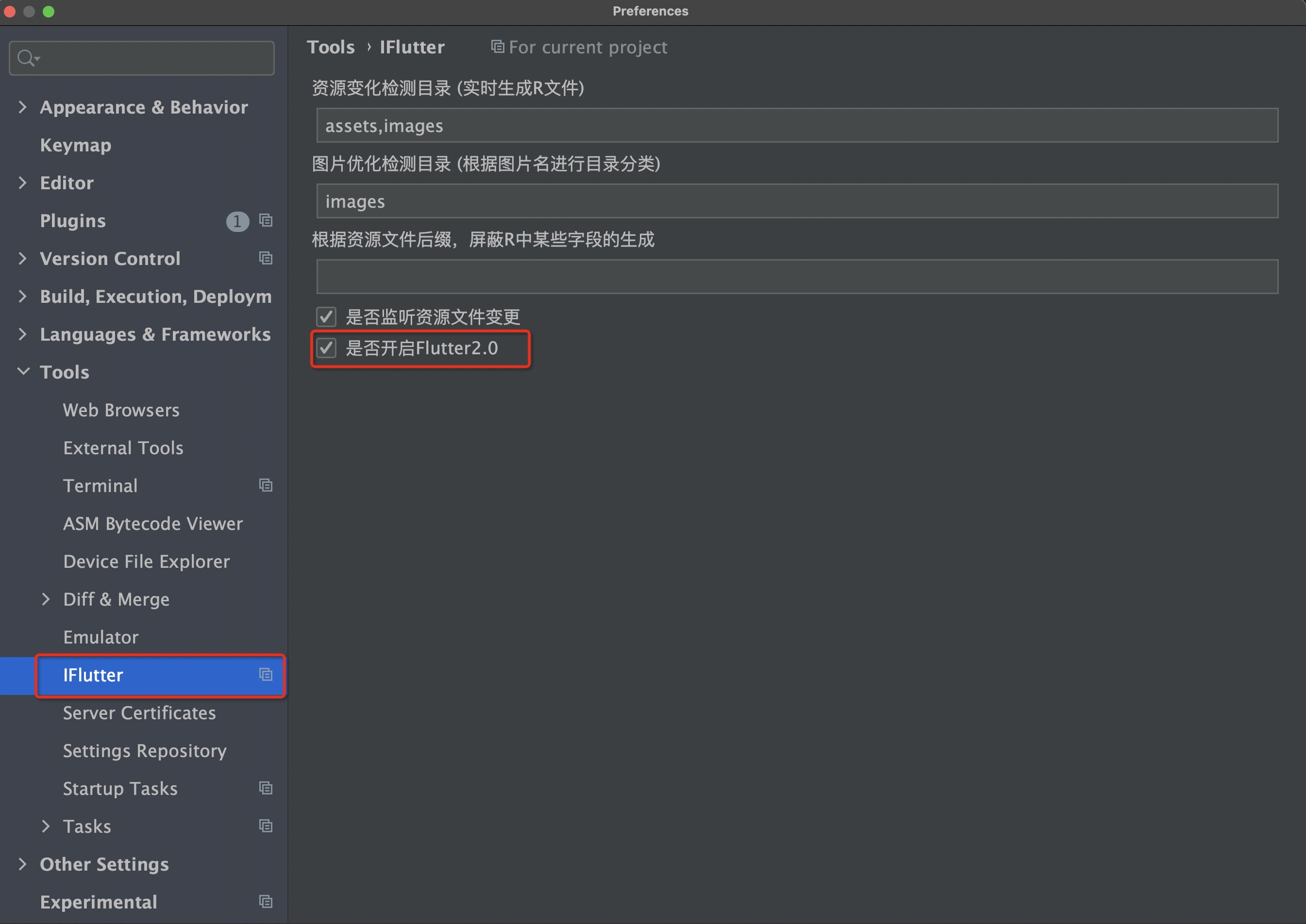
配置选项
- 启用空安全:生成符合 Dart 空安全规范的代码
- 禁用空安全:生成兼容旧版本 Dart 的代码
📝 命名规范
类名命名
建议使用 驼峰命名法(PascalCase) 来命名生成的类:
| 推荐 ✅ | 不推荐 ❌ |
|---|---|
UserInfo |
userinfo |
ProductDetail |
product_detail |
ApiResponse |
api-response |
字段命名
生成的字段名会根据 JSON 键名自动转换:
| JSON 键名 | Dart 字段名 | 说明 |
|---|---|---|
user_name |
userName |
下划线转驼峰 |
user-id |
userId |
连字符转驼峰 |
UserAge |
userAge |
首字母小写 |
🎯 生成示例
输入 JSON
{
  "id": 1,
  "name": "John Doe",
  "email": "john@example.com",
  "age": 30,
  "is_active": true,
  "profile": {
    "avatar": "https://example.com/avatar.jpg",
    "bio": "Software Developer"
  },
  "skills": ["Flutter", "Dart", "JavaScript"]
}
生成的 Dart 代码
class User {
  final num? age;
  final String? email;
  final num? id;
  final bool? isActive;
  final String? name;
  final ProfileEntity? profile;
  final List<String>? skills;

  User({
    this.age,
    this.email,
    this.id,
    this.isActive,
    this.name,
    this.profile,
    this.skills,
  });

  factory User.fromJson(Map<String, dynamic> json) {
    return User(
      age: json['age'],
      email: json['email'],
      id: json['id'],
      isActive: json['is_active'],
      name: json['name'],
      profile: json['profile'] == null
          ? null
          : ProfileEntity.fromJson(json['profile']),
      skills: json['skills']?.cast<String>(),
    );
  }

  Map<String, dynamic> toJson() => {
        'age': age,
        'email': email,
        'id': id,
        'is_active': isActive,
        'name': name,
        'profile': profile?.toJson(),
        'skills': skills,
      };
}

class ProfileEntity {
  final String? avatar;
  final String? bio;

  ProfileEntity({
    this.avatar,
    this.bio,
  });

  factory ProfileEntity.fromJson(Map<String, dynamic> json) {
    return ProfileEntity(
      avatar: json['avatar'],
      bio: json['bio'],
    );
  }

  Map<String, dynamic> toJson() => {
        'avatar': avatar,
        'bio': bio,
      };
}